Creating a Home Office Workstation


Back when I was still working in a corporate office, I often daydreamed about working from home. I pictured myself sitting on the couch, laptop on my lap, favorite playlist in the background, and wearing my most comfortable pambahay clothes.
Fast forward to today, after spending years working from home, I realized something important: while working on the couch feels cozy, it’s not the most productive setup. The temptation to nap, binge-watch TV, or simply “rest for a few minutes” is just too strong.
That’s when I learned the value of having a dedicated home office workstation. It’s not just about having a spot for your laptop — it’s about creating a space where you can focus, stay organized, and actually get things done.
If you don’t have one yet, here are practical tips to help you design a workstation that makes working from home less stressful and far more productive.
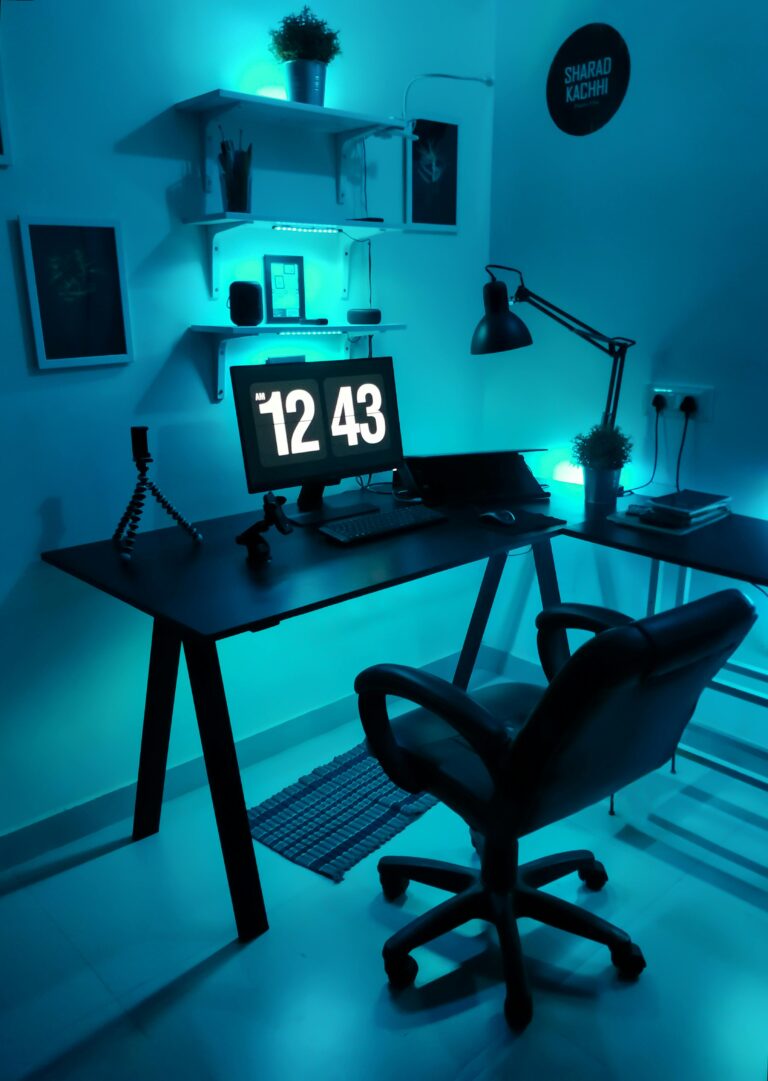
1. Plan Your Layout
Before you buy a desk or move furniture around, think about where your workstation will live.
- Spare room advantage – If you have a spare room, converting it into a dedicated office is ideal. Closing the door creates a psychological boundary between “home mode” and “work mode.”
- No spare room? No problem. Even a quiet corner in your living room, dining area, or bedroom can work. What matters is that it’s consistent — your brain will eventually associate that space with productivity.
- Desk options – An L-shaped desk works well for multitaskers (computer on one side, paperwork on the other), but if space is tight, a small rectangular desk or even a sturdy dining table is fine.
- Storage solutions – Don’t underestimate the value of storage. A filing cabinet, bookshelf, or even a rolling utility cart can keep your space tidy without taking up much room.
👉 Pro tip: If possible, set up near a window for natural light and fresh air. It reduces eye strain, boosts mood, and helps you feel more energized throughout the day.
2. Invest in Essentials
You don’t need to spend a fortune, but certain investments pay off in productivity and comfort:
- Good lighting – Natural light is best, but a bright desk lamp with adjustable settings will prevent headaches and fatigue during late-night work.
- Ergonomic chair – Forget using your dining chair long-term. A chair with lumbar support and adjustable height helps prevent back pain, especially if you work long hours. Think of it as an investment in your health, not just furniture.
- Desk setup – Position your monitor at eye level (use a stand or stack of books if needed) to avoid neck strain. Keep your keyboard and mouse at a comfortable height.
- Time management tools – A small clock, digital timer, or even apps like Pomofocus can help you stay disciplined and avoid burnout.
- Trash and recycling bins – Simple but often overlooked. A clutter-free workstation starts with managing waste.
👉 Don’t forget Internet stability. For remote work, a strong Wi-Fi connection is as essential as your desk and chair. If your signal is weak, consider a Wi-Fi extender or even a backup pocket Wi-Fi.
3. Organize Smartly
A messy desk creates a messy mind. Organization is one of the most underrated productivity boosters.
- Designate zones – Have a space for books and reference materials, another for daily supplies (pens, notepad, calculator), and a clear area for your laptop or monitor.
- Vertical space – Use wall shelves, corkboards, or pegboards to pin reminders and free up desk space.
- Cable management – Use clips, ties, or even binder clips to keep cords from tangling. A neat workstation minimizes distractions.
- Minimalism wins – Keep only the essentials within reach. Store everything else out of sight but accessible.
Remember: a tidy desk equals a clearer mind. Less clutter, more focus.

4. Add Inspiration
Your workspace shouldn’t feel sterile. Inject a bit of personality to make it motivating.
- Visual reminders – Hang a motivational quote or vision board where you can see it. Daily exposure reinforces your goals.
- Nature effect – Add a small plant. Studies show that greenery reduces stress and boosts creativity. Even a low-maintenance succulent can do wonders.
- Color psychology – Bright colors (yellow, orange) can energize, while cool tones (blue, green) promote calm focus. Neutral backgrounds (white, beige, gray) work best for avoiding overstimulation.
- Personal touch – A family photo, travel souvenir, or meaningful item can remind you why you’re working hard.
👉 Just don’t overdo it. Your workstation should inspire, not distract.
5. Consider Ergonomics and Health
One mistake many remote workers make is ignoring physical health. Long hours in the wrong posture can cause lasting problems.
- Monitor position – Your screen should be at eye level, about an arm’s length away.
- Keyboard and mouse – Keep elbows at a 90-degree angle, wrists straight, and shoulders relaxed.
- Chair height – Feet should rest flat on the floor (use a footrest if needed).
- Movement breaks – Stand up, stretch, or walk around every 45–60 minutes. Apps like Stretchly can remind you to move.
If budget allows, consider a sit-stand desk. Alternating between sitting and standing reduces back pain and boosts energy.
6. Optional: Feng Shui and Flow
Some people swear by feng shui principles in their workspace, and even if you don’t fully believe in it, the logic behind it often aligns with good design.
- Avoid working in bed – Mixing rest and work blurs boundaries and hurts sleep quality.
- Positioning – Sitting facing a window or open space feels more energizing than facing a wall. If your desk must face a wall, add art or a bulletin board for visual relief.
- Warm elements – Wood furniture or warm-toned accents can make your space feel more inviting.
At the end of the day, it’s about making your environment feel good for you.
7. Balance Work and Life
A productive workstation isn’t just about tools and design — it’s about boundaries. When you work from home, the line between “work” and “home life” can easily blur.
- Set a schedule – Start and end work at consistent times.
- Shut down rituals – When you finish work, close your laptop, clear your desk, and step away. This signals your brain that the workday is over.
- Respect rest spaces – Avoid working in bed or on the couch regularly. Keep those areas sacred for relaxation.
This way, you’ll enjoy the perks of working from home without feeling like you’re always “on.”
Final Thoughts
A home office workstation doesn’t have to be fancy or expensive. What matters is that it’s dedicated, organized, and inspiring. With the right layout, tools, and personal touches, you’ll create an environment that makes it easier to focus and get things done.
Working from home has its perks — no commute, flexible hours, and comfort — but without structure, it can also lead to distractions and burnout. By investing in your workstation, you’re not just working smarter; you’re also protecting your health, maintaining balance, and making sure your time at home is used wisely.
Remember: Your environment shapes your productivity. Design it intentionally, and your results will follow.